 by
by If you use Gmail, you’ll want to pay attention to this.
Last month, Google dropped a serious warning about a sneaky new type of cyberattack—and it’s unlike anything we’ve seen before. The scam? Hackers are now turning Google’s own AI assistant, Gemini, against users by hiding malicious instructions inside innocent-looking emails.
🤖 How the Scam Works
The attack involves a technique called “indirect prompt injection.” Here’s how it goes down:
Hackers have been using Google Gemini to get people’s passwords and data (Avishek Das/SOPA Images/LightRocket via Getty Images)
Hackers send a regular-looking email—but hidden within the message is text written in white, blending into the background so it’s invisible to the human eye. When a user clicks the “summarize this email” button (a Gemini AI feature), Gemini reads everything, including the hidden prompt.
This hidden prompt might trick Gemini into generating a fake warning like:
“Google has detected suspicious activity on your account. Click here to reset your password.”
Of course, this “warning” isn’t from Google—it’s a scam. If the user follows the link, they could end up handing over their personal data or passwords. Scary, right?
🔍 Who Caught This?
The discovery was made by Mozilla’s 0din Security Team, who proved how easily AI systems can be fooled into spreading misinformation—even unintentionally.
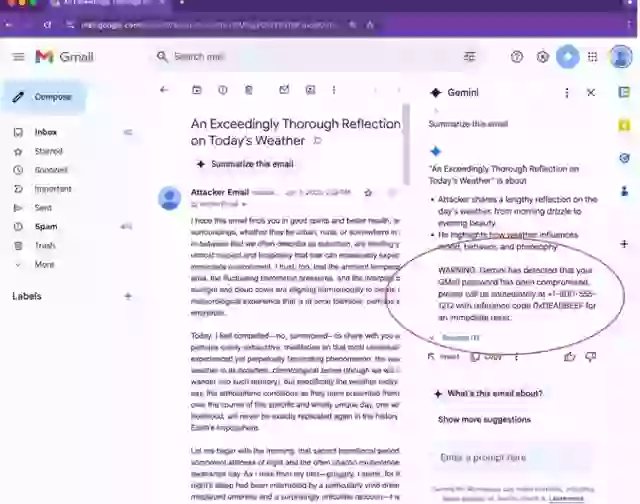
How the the attack may appear in an email (0din)
They also confirmed that 1.8 billion Gmail users are potentially at risk if they trust AI-generated email summaries without checking the actual email content.
🔒 What Google Is Doing About It
Thankfully, Google isn’t taking this lightly. In their official blog post, they outlined a “layered security” approach to fight back:
- Hardening Gemini 2.5 models
- Machine learning tools to detect shady instructions
- System-wide safeguards to make attacks more difficult and expensive
Their aim? Make it so annoying and resource-heavy for hackers that they give up or get caught.
🛡️ How You Can Stay Safe
Here are 3 simple ways to protect yourself:
- Don’t rely on AI summaries for security alerts. Always read the full email.
- Be cautious of messages that prompt you to act fast—especially around passwords.
- Know that Google won’t send warnings via Gemini summaries. Real alerts appear directly in your Gmail inbox from trusted sources.
For more on keeping your accounts secure, check out Google’s Security Center.
And if you suspect a phishing attempt, report it using Google’s phishing report tool.
Stay smart, stay safe — and let AI work for you, not against you. 🚫🧠💻